
Claude Code Skills as Executable UML

Could your next Claude Code skill be a diagram? Not a diagram just describing the skill — a diagram that is the skill, executed like code? The answer is yes. Once you’ve tried it, like me, you may not want to go back.
Yet again, Claude Code just gave you another face-palm moment. You had asked it to run the tests and tell you which ones failed. Instead, it ran them, saw two failing assertions, and “fixed” them — by editing the assertions until they passed. Sigh!
You open the SKILL.md, and add another line: “Do not modify, edit, or rewrite failing tests to make them pass. A failing test is a result. Report it. Do not repair it.”
That’s four things it shouldn’t do in one paragraph. Four prohibitions.
I stopped to count similar lines in one of my skills. The one that runs my Test-Driven Agentic Behaviours scenarios. It had two dozen of them.
Every one of those prohibitive statements was scar tissue.
This is a lot like legal contracts – every prohibitive clause and penalty came from someone, somewhere, doing something they weren’t supposed to, some time in the past.
But, most of us creating Claude skills aren’t lawyers, so even when we do add these clauses — with or without Claude’s help — they aren’t always iron clad. And, there’s almost always some scope for the LLM to rationalise its way past them.
Prose is the problem
The problem isn’t that none of us are lawyers. The problem is prose itself. Even legal contracts can be open to misinterpretation, have unhandled edge cases or loopholes created by something as little as a misplaced comma, or wording that’s too open to interpretation.
Most people, until recent times at least, write prose for the workflow of a skill — numbered steps, sub bullets, “if X then do Y” sentences, side notes about edge cases. The LLM reads it and tries to execute the implied control flow.
This felt familiar. It reminded me of old-fashioned functional specifications from the 1990s (that was the last time I had the misfortune of dealing with those). They were often quite word heavy and easily misinterpreted. Developers would interpret them one way, and testers another. I’m sure you can imagine (or even remember) how that worked out.
This varied interpretation was often reduced with pseudo code and UML diagrams. For me, it wasn’t until eXtreme Programming came along with test-first practices, outside-in customer tests and test-driven internal design using unit tests, that many of these problems for me went away.
No matter how practices changed, we never stopped using diagrams. Sometimes, pseudocode comes in handy too.
So, if diagrams and pseudo code helped reduce misinterpretation in the past, could that help reduce misinterpretation with LLMs today?
An idea I’d parked
About a year ago, my brother — Raymond Rodriguez — showed me a DSL he’d built for his custom GPTs in ChatGPT. More than a DSL, really; it had grown into something more like a whole programming language.
He had noticed his GPTs stayed more reliable when he wrote instructions in a form they could treat like code rather than prose.
He’s gone on to build a sophisticated architecture out of it, and used it to put together GPTs that have done some genuinely impressive work — not least going through the accounts of a charity and uncovering some “naughty” accounting nobody else had spotted.
That was the first time I’d come across the idea. Since then, I experimented with it with Claude Code, but I didn’t get far. I wasn’t sure how to map his approach onto the things I was building, but more importantly – I couldn’t see how to make it accessible to others without the huge barrier to adoption of a huge learning curve. So, I parked it.
Then one day, while drawing PlantUML diagrams of my Test-Driven Agentic Behaviours (TDAB) framework — diagrams I was making to help others understand how it works — I looked at the markup and thought, could Claude Code follow this, instead of prose, as a skill?
@startuml
if (result?) then (PASS)
  :Cue reporter-pass;
  fork
    :Cue time-recorder
    (update benchmark);
  detach
  fork again
  end fork
else (FAIL)
  :Cue reporter-fail;
endif
@enduml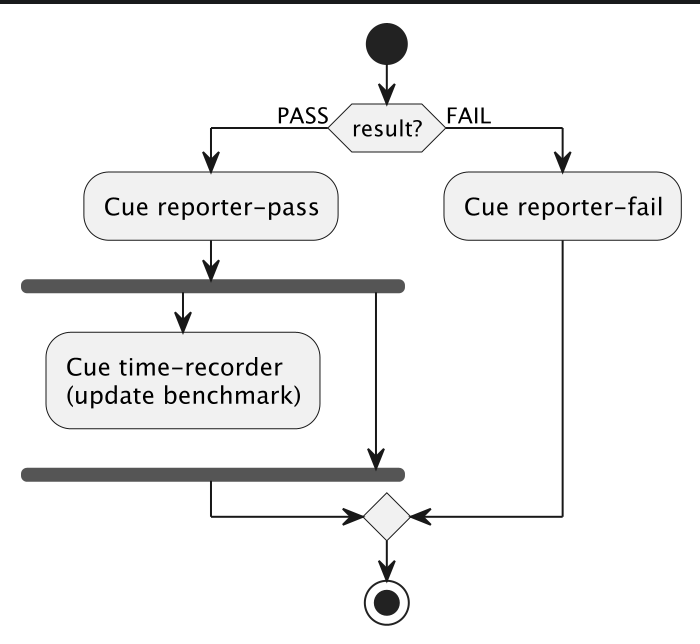
So with what my brother had shown me in the back of my head, I tried it.
An old language for a new problem
PlantUML was released by Arnaud Roques in 2009. It is a text-based diagramming language. You write pseudocode and it compiles to a diagram. There’s a variety of diagrams available, but for this application, an Activity diagram was the most appropriate:
@startuml

|Session Agent|
start

:Run init-scenario;

:Cue rehearsal
(launch all subagents in parallel);

:Await: rehearsal completion notifications

from ALL launched subagents.
- Any failure = FAIL
- do not repair or retry;

if (result?) then (PASS)
  :Cue reporter-pass;
  fork
    :Cue time-recorder
    (update benchmark);
  detach
  fork again
  end fork

else (FAIL)
  :Cue reporter-fail;
endif
stop
@enduml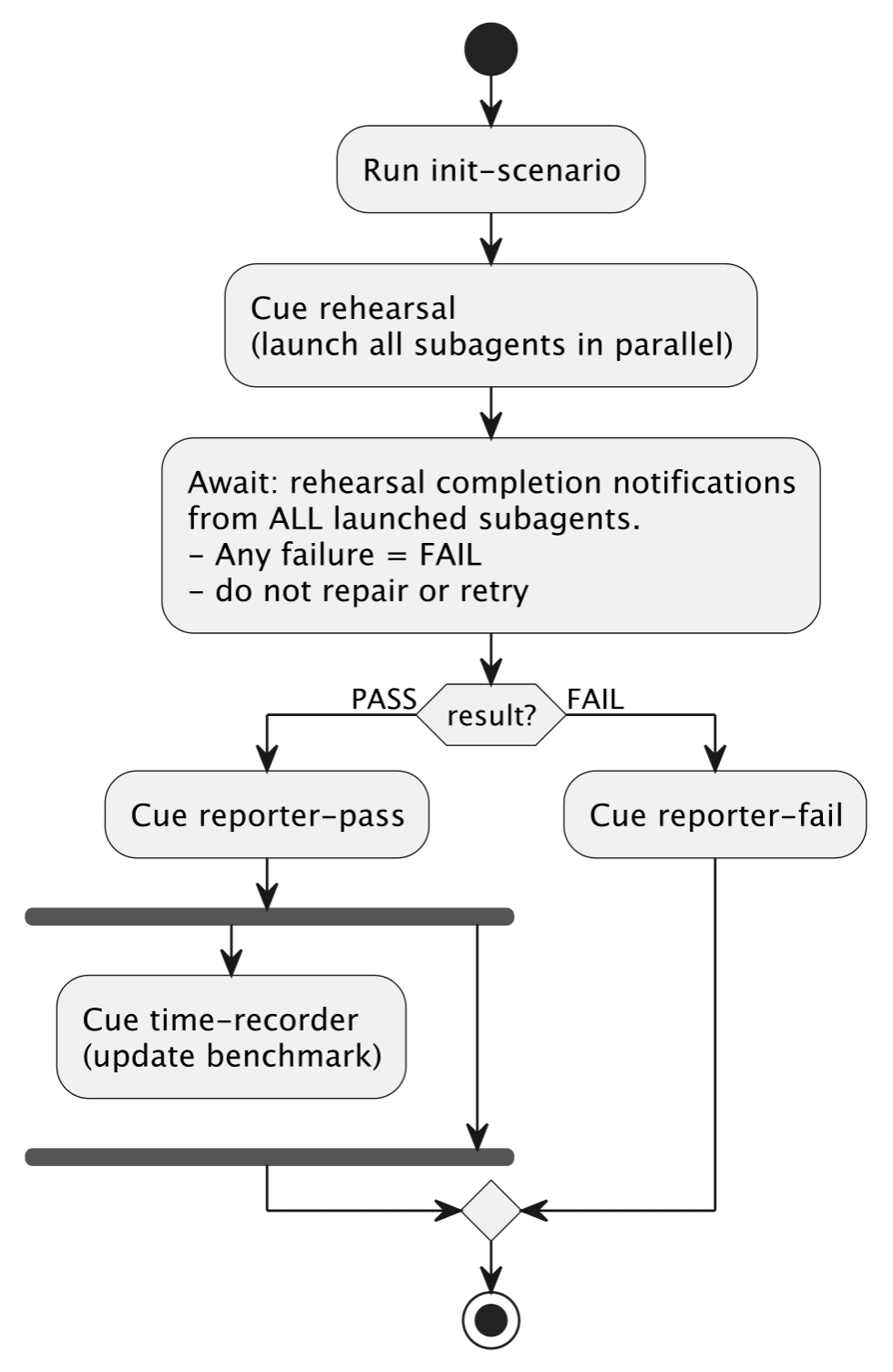
That’s most of my single-test orchestration from a prototype agentic test-runner (yes, that tests agent behaviour). Read top-to-bottom. Each :thing; is an activity. The branches and forks are keywords, not sentences. The |Session Agent| line is a swimlane — it tells you which actor is performing the activities below it (more on that shortly).
Thanks to a prototype Claude plugin I’ve created, this flow is executed as a skill. There’s a SKILL.md that bootstraps the interpreter and the diagram (with very few words). The plugin — originally just a local SKILL.md — defines what Cue , Run , Await , Inform , and Ask mean as keywords. The interpreter is loaded once per session, and every PlantUML skill that references it, gets to use it (amortising any overheads across many skills).
Once I had that working, using it started to feel different — in a good way.
Focussing on what the skill does
What happened next was interesting. I found that I was spending more time thinking about what the skill should do, rather than fighting with Claude over what it shouldn’t do.
Now, I had a TDAB scenario runner skill (tdab-run) written in prose already. So, I started to write a new version, that I called tdab-play. This used the PlantUML infused with my DSL. During this process I hardly had to say what not to do, and it got it right every time.
Both skills had been evolved against the same agentic test-scenario, against the same agent, against the same reliability bar — back-to-back successful test-runs. Neither skill had any more than was absolutely necessary to achieve equivalent behaviour.
To achieve this parity there were:
24 prohibitive clauses in the prose skill.
11 in the diagram.
Those were the “do not”, “MUST NOT”, “Never”, “REQUIRED”, and friends. The PlantUML based version had about eleven, in roughly the same volume of text. My brother’s point was proven.
Every one of those prohibitive clauses came about from a test-failure or observed misbehaviour. They didn’t happen because I was being cautious. They carried an overhead of having been affected by a deviation, having to stop, change the skill, re-run my tests, tweak it again, and so on.
For example, in the prose skill, it said:
- There is code that complements this skill, that you do not need to understand in order to play your part, and because you don’t know what it does – do not intervene in any way because you may cause the process to fail unintentionally. If you have a desire to intervene, ask the user before taking any action.
- After launching subagents and calling `start-transcribers`, do not run any Bash commands or take any other action. Wait silently for completion notifications
Every part of that arose from a test-failure, catching Claude misbehaving, getting too involved, making assumptions about what it was there to do and getting in its own way.
With the PlantUML based version, to achieve the same outcome with the same repeated reliability this was compressed into the following with only one prohibitive statement:
:Await: rehearsal completion notifications from ALL launched subagents.
- Any failure = FAIL
- do not repair or retry;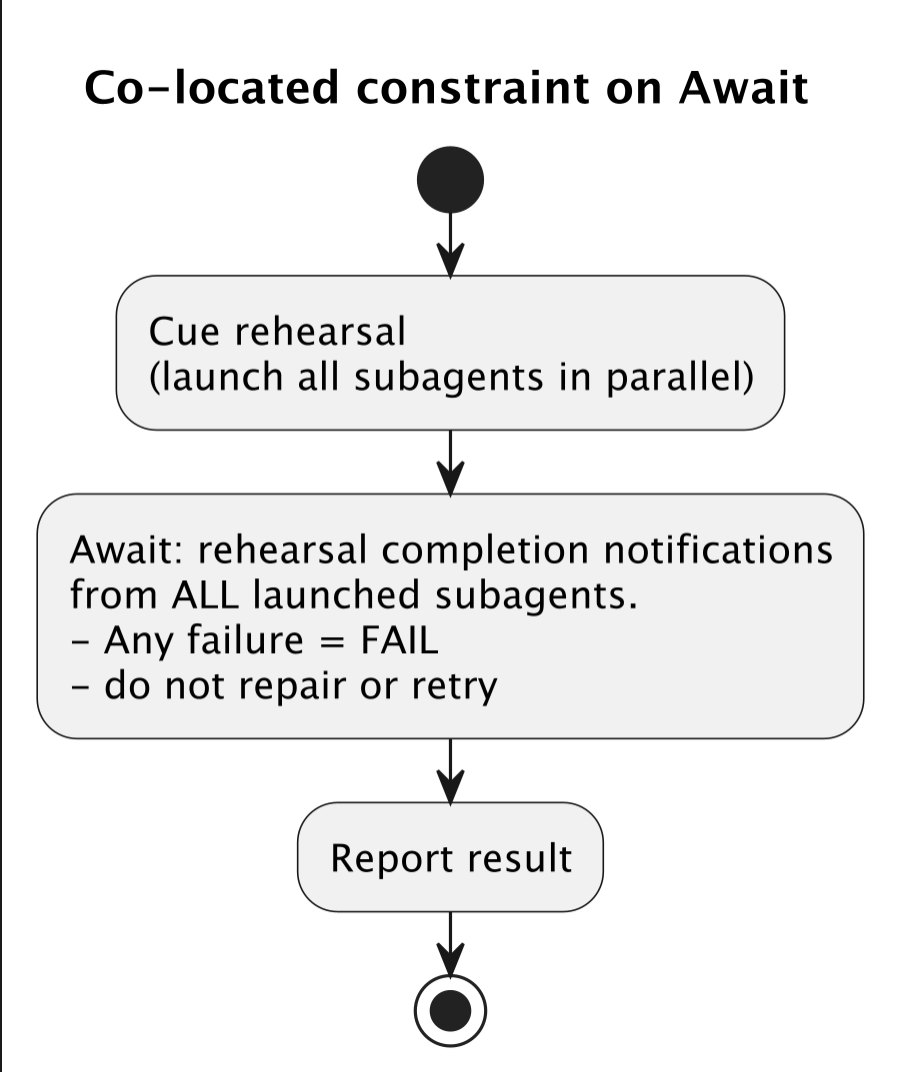
The agent reads it. The single constraint is co-located with the activity it governs. There is nothing else to do until the `Await:` completes. There’s no gaps for assumptions to be made. It’s so easy for it to know what it’s supposed to do, I don’t have to prohibit all the things it’s not supposed to do quite as much.
With the PlantUML based skill, it just worked.
Does it come at a cost?
By this point, I had built two functionally equivalent test runner skills — one prose, one PlantUML based.
The PlantUML interpreter was just a v0 prototype. No optimisation has been attempted yet. I just made it, got it working, and laid the files out in the skills that use it in a way that ‘felt right’ from an ease of use point of view.
My TDAB framework let me run the same test scenario back-to-back across sixteen Claude Code sessions, alternating between both versions of the skill. Eighty-eight runs total. Forty-four per skill.
The PlantUML version of a skill is more files — a SKILL.md , a separate diagram, an interpreter that defines the diagram’s keywords, and a folder of small direction files for a few of the activities. Ten files where the prose version had one.
Surely that means more tokens?
Yes, but not as many as you’d think. As a static payload, the two skills come out within about 150 tokens of each other:
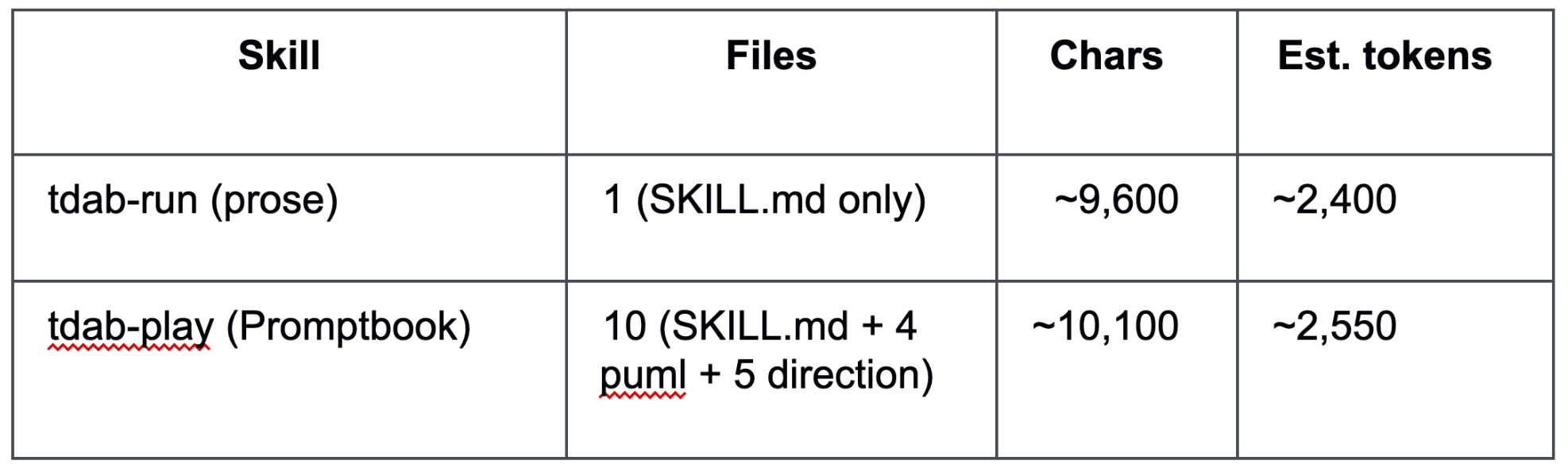
This is because the .puml files for the diagrams are sparse, the direction files are tiny, and added up they amount to roughly the same volume of text as the prose version. Again, before I’ve even tried to tune it.
What’s different is how it’s read. Ten files aren’t loaded in one go — each one is a tool call. The agent reads the diagram, decides what to load next, reads a direction file, decides again. Each of those steps generates output tokens around the read itself (before it is cached of course).
So the footprint is similar; the cost of getting through it isn’t. And unlike speed — which I’ll get to in a moment — the gap doesn’t disappear once the cache warms up.
Cold runs. The first run after /clear , prompt cache built from scratch
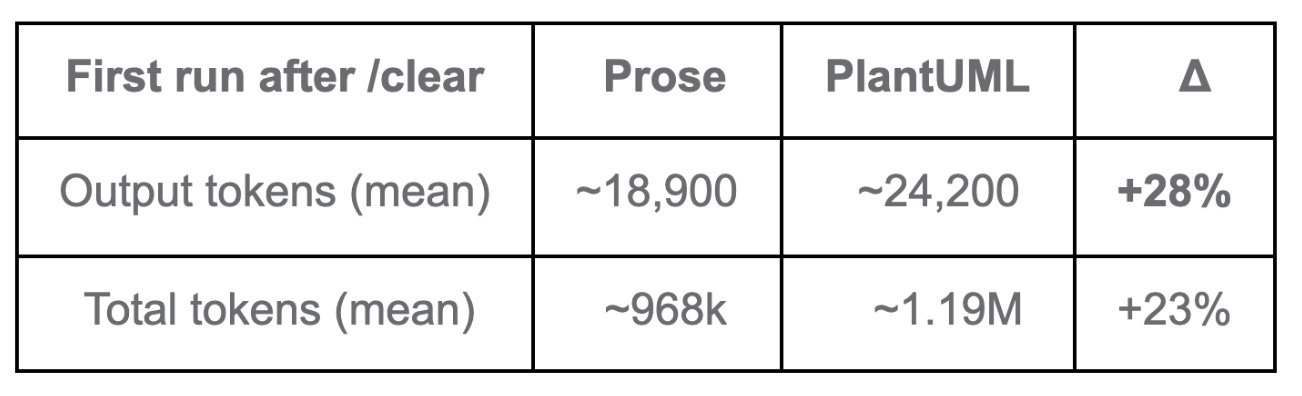
That’s the cost of loading the larger first-time payload — the interpreter, the diagram, ten files instead of one. Warm runs. From Run 3 onward, the per-run figures settle. They don’t, however, converge:
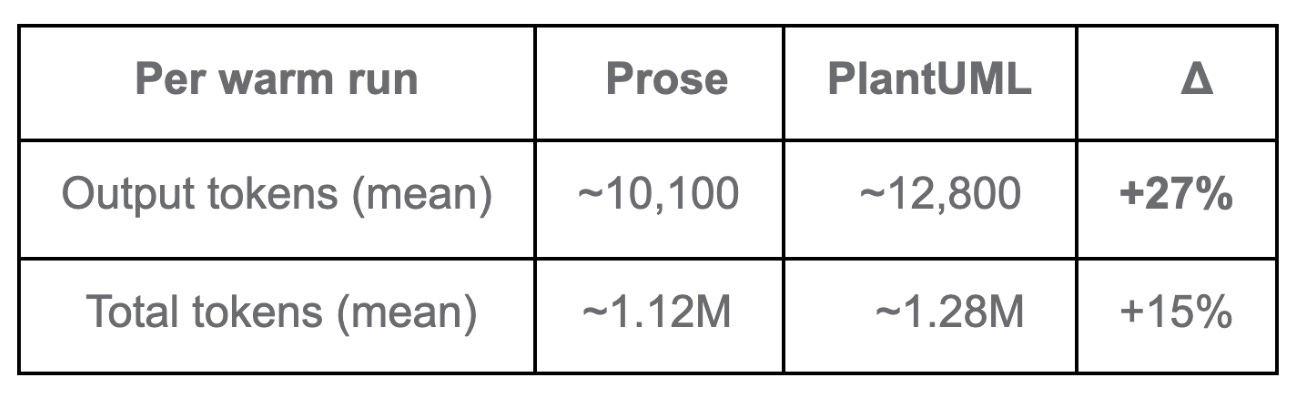
The output gap is the steadiest signal across the dataset — about +27% to +28% on both cold and warm runs. The Session Agent simply generates more text per turn under PlantUML interpretation. That doesn’t amortise; it shows up on every run.
So no — the cache doesn’t make this go away. It moderates the gap from cold to warm, but a per-run premium remains.
If you’re on Pro or Max, Anthropic doesn’t publicly document how the four token types count against plan limits, so the practical impact sits somewhere between +15% (if total tokens count equally) and +27% (if cache reads are heavily discounted).
While it’s not a deal-breaker for me (yet), it could be for others. For this reason, token usage is where I’ll focus my attention on tuning.
For a prototype that was just to see if PlantUML could form the basis of a skill’s workflow, this isn’t a terrible starting point.
What about speed?
Speed of execution was one of the things I had expected to break it. More files, more reading, more chasing of links. Surely each test run takes longer.
On the first ‘cold’ run, yes the skill is slower. This is because the Session Agent has to do more work to bring the diagram, interpreter, and ten files that the skill I was testing with into context. But, this was only on a cold-start.
From Run 3 onward, once the prompt cache had warmed up, the two are close on mean values and within a second of each other on the medians — with the PlantUML based skill a hair faster.
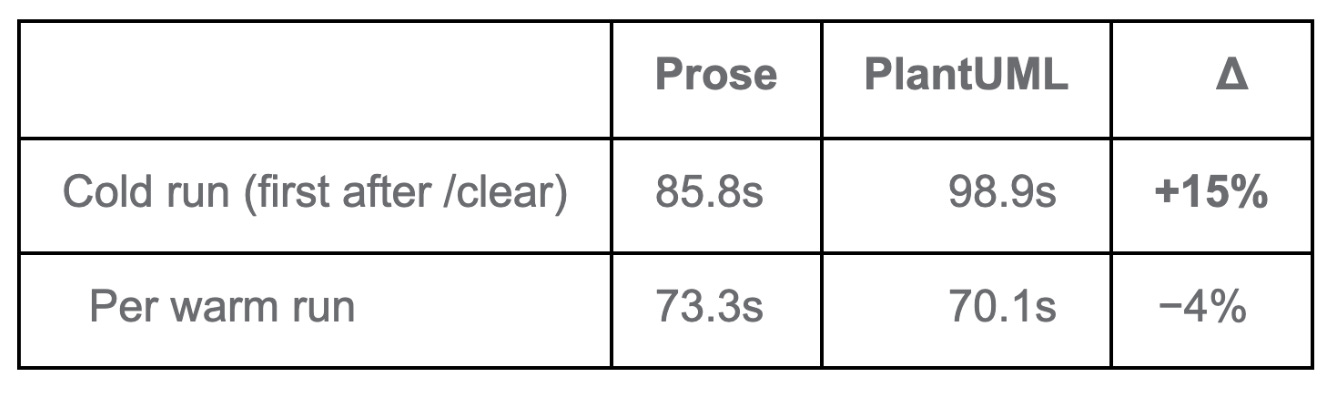
The cold premium is paid once per session and isn’t recovered on later runs — but it isn’t compounded either. From the second or third run onward, you’re paying a flat per-run cost, not a growing one.
So: about 15 seconds slower on the first run, similar — and slightly faster on average — after that.
So, as a place to start before I have even tried to tune it, I was quite pleased.
Better readability
Beyond the numbers, the diagram form gave me something prose couldn’t.
As part of the testing, I had already incorporated some changes to improve readability.
I used different shapes for each activity, based on the Specification & Description Language (SDL):
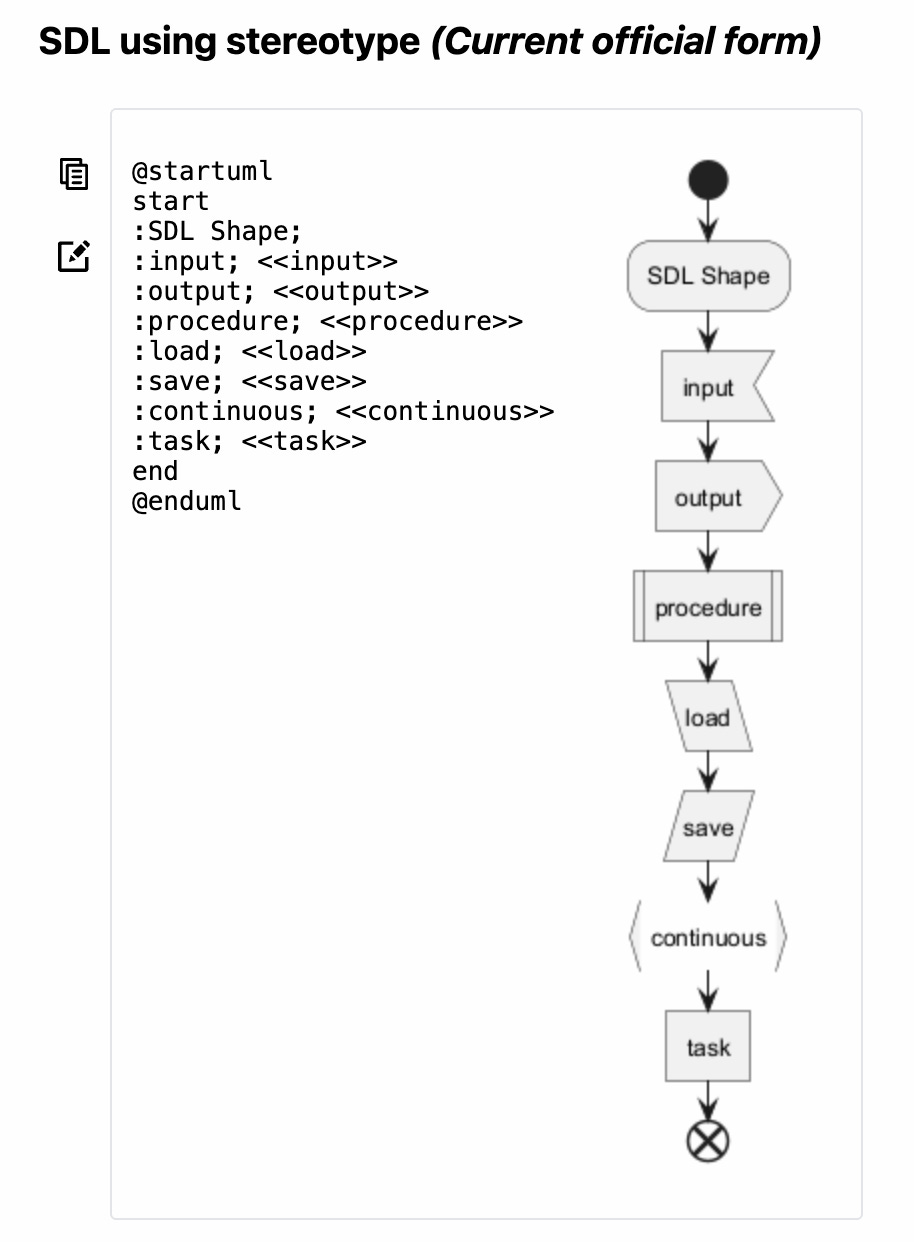
After sketching with a few shape sets, SDL was the one I could read the fastest. Different shapes let me see at a glance whether an activity is an input, an output, or a procedure — before I had even read the label.
Now, my single-test-run skill, looks like this (including a splash of colour):
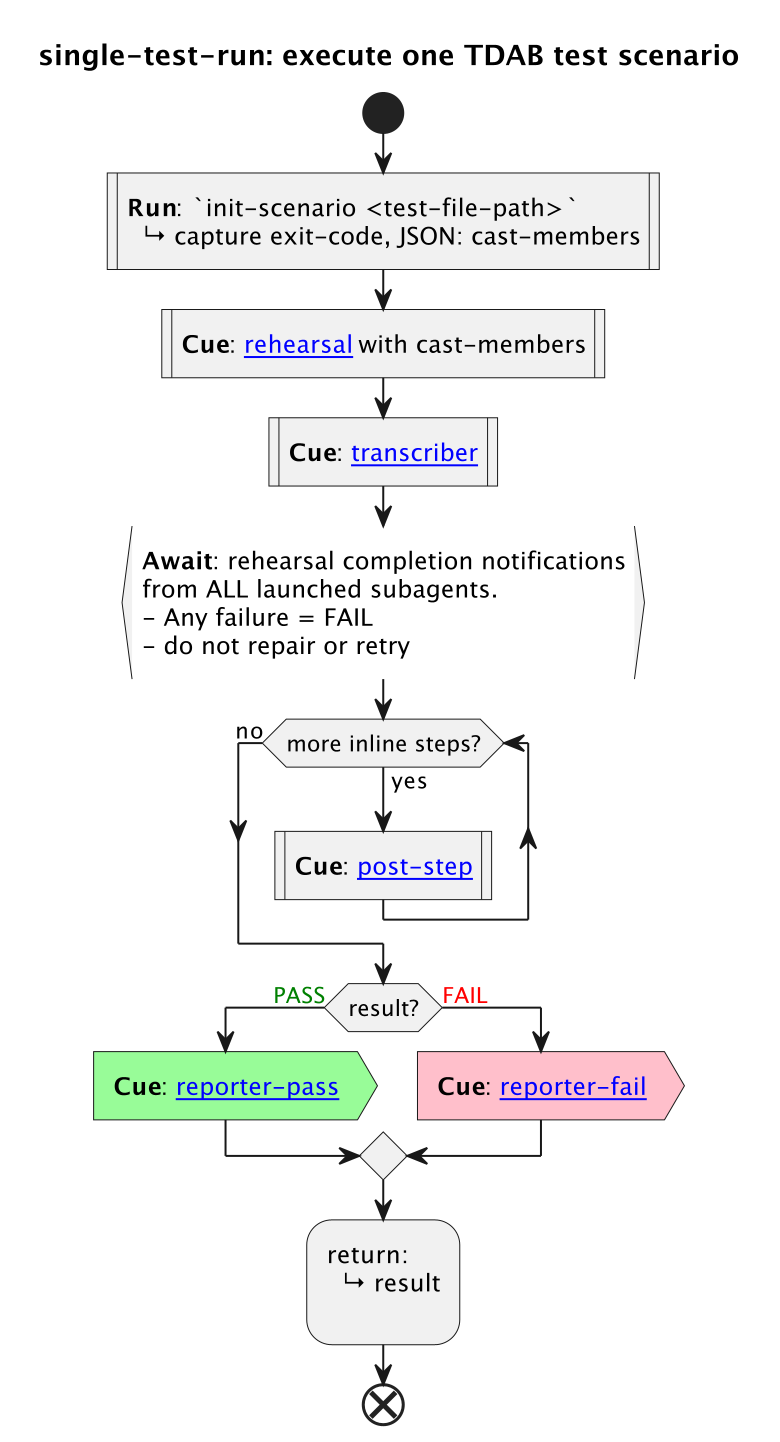
For now, these shape and colour labels are ignored by the interpreter. Later, I may use the shape label to refine the interpreter, so the LLM understands them and adjusts how it handles a given activity accordingly.
You’ll also notice that some of those activities include links. These can be to other PlantUML files, or to .md files with prose — where prose might be the better choice or where an output template is required.
Who is doing what
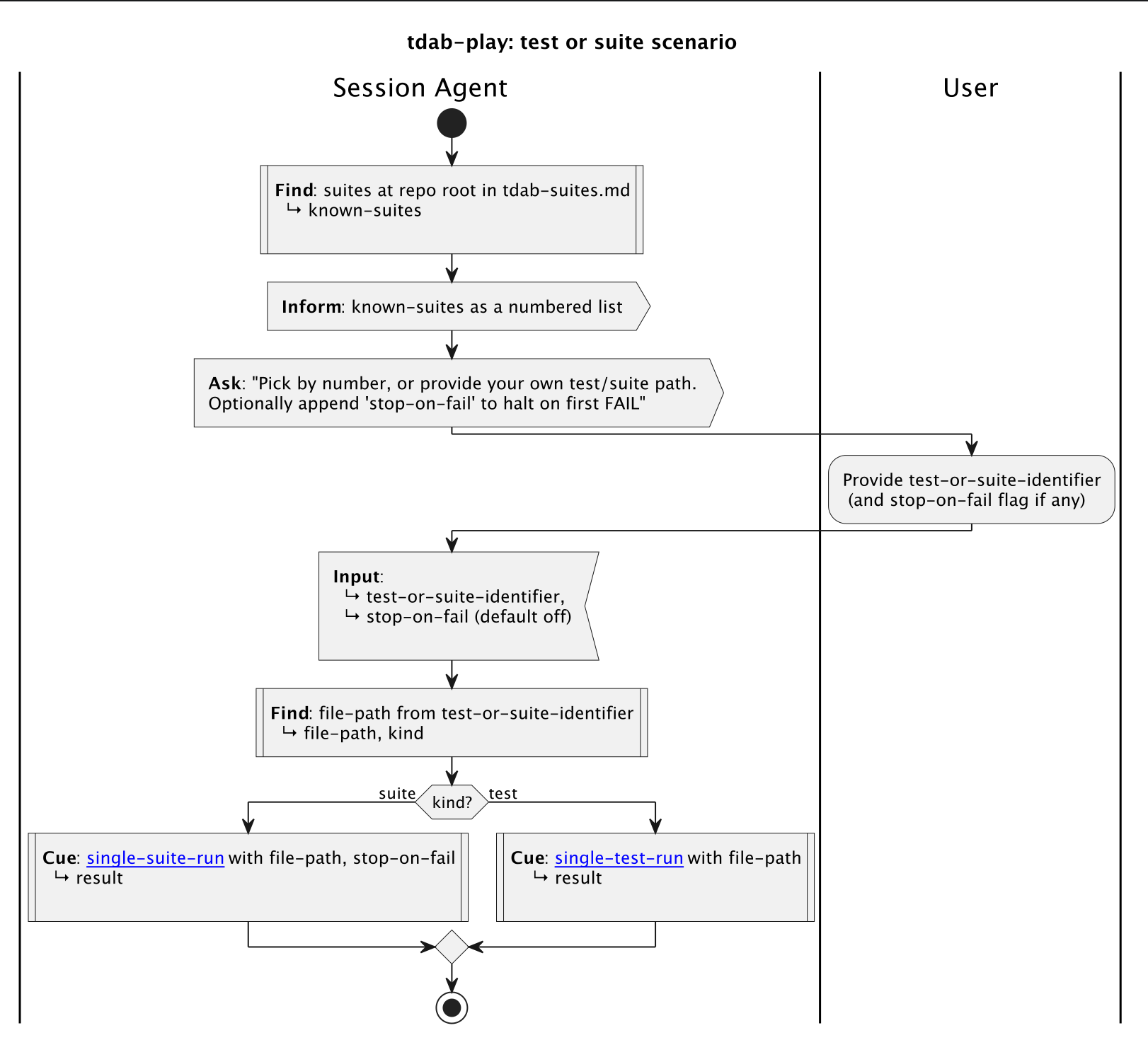
Another feature that was included in my testing was swimlanes. Swimlanes tell the LLM who is doing what. It makes it clear when it is something the agent should do and when it is something a user needs to do. Of course, swimlanes can be used for explaining multi-agent skills too.
Worth it!
Yes. Even with the overheads at runtime, honestly, I’m hooked. It’s just a better way to do things.
24 “do not” clauses became 11, to reach the same operational behaviour. And with the PlantUML based skill, fewer of those misbehaviours even occurred. That meant…
I spent more time on what the skill should do, and less time fighting with Claude over what it shouldn’t. With the prose version, every misbehaviour was extra work for me — and extra tokens spent both diagnosing it with Claude and re-running the TDAB scenario afterwards. I haven’t measured whether those avoided round-trips offset the higher per-run cost, but I wouldn’t be surprised if they did.
I could see what the skill was doing at a glance. As I made changes, bad choices became visible before I even used the skill. The diagram spoke for itself. Catching errors in my thinking up front cost no tokens, whereas the same mistake found mid-run did.
It was just, overall, a much better experience.
Have a play
And all of that is how Stagentic Promptbook was born. A Claude Code plugin that allows you to try the approach too. It’s what all the testing I’ve done has been based upon.
I’m dogfooding it right now to create the replacement for my Test-Driven Agentic Behaviours prototype, an open-source tool that will live under the Stagentic brand.
Why call it Promptbook? Because of the theatre metaphor behind the Stagentic name:
Stage + agentic. Because each agentic-test scenario is a rehearsal, evaluated by the director with a scorecard.
When the performance isn’t up to scratch, you improve your direction, and the agent rehearses again, and again until you get the repeatable performance, or behaviour, you want.
In theatre, a promptbook is the stage manager’s master copy of a play: the full script alongside every cue (light, sound, scene-change, actor entrance), plus blocking, props lists, and timings. It’s the operational source of truth for putting on the show — anyone who can read a promptbook can run the production from it.
For the deeper write-up — methodology, raw run data, the lot — see the analysis on GitHub. Or, to see this for yourself in under a minute in Claude, submit these commands, one after the other:
/plugin marketplace add stagentic/stagentic-cc-marketplace
/plugin install stagentic-promptbook@stagentic/reload-pluginsRun /decisions-demo to load the worked example and follow along.
Just have a play.
(pun intended)
—
Antony also available as a consultant for hire.